Showing posts with label technical. Show all posts

, DIY Sound trigger - it's alive

0 comments

Basically, just buy this sound sensor, stick it to an Arduino and with this cable trigger the flash (I did it through an optocoupler). Have fun !
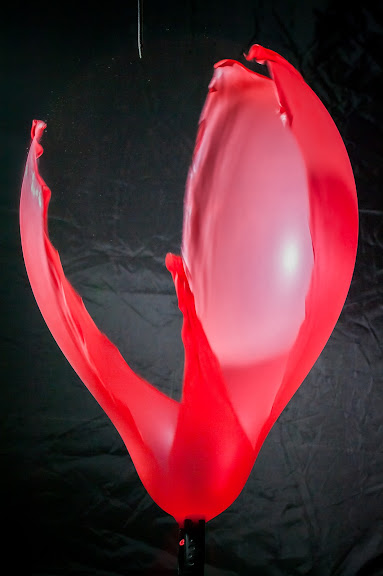
popping ballon - sound trigger popping ballon - sound trigger

Pentax (Samsung) debug mode - noise reduction fix

4 comments

UPDATE: Unfortunately the hot pixels can NOT be ignored when disabling the noise reduction, so unless you manually create a dark frame after the shot it's pretty much pointless. Proof, the following two images:

Samsung GX-20 noise (dark frame subtraction OFF)
Crop from a 30 seconds exposure of the night sky
Samsung GX-20 noise (dark frame subtraction OFF)
Crop from a "star trails" 1 hour exposure (hopeless indeed - the pink thingy isn't because of white balance :D, it's pure noise)

I've finally found a way (about an year ago but I was too lazy to post it here) to disable the forced noise reduction of my Samsung Gx20 camera - that I'd mentioned here. Many thanks to the guys from Pentax-hack.

As they say on their site, basically you have to create a text file in the root of the memory card (called "MODSET.454" for GX20 v1.01, v1.03), and enter the proper commands in the file ([DEBUG_MODE EN] Enables debug mode; [DEBUG_MODE DIS] Disables debug mode).

You will also need SYSPARAM.TXT file, in which various internal parameters are set (among which the ones related to noise reduction ;) ).
Here are the setting that I use:

>MODSET.454
[DEBUG_MODE EN]

>SYSPARAM.TXT
[FORCENR] 0@[DISABLENR] 1@[DISABLEBLC] 1@

For more info see: http://www.pentax-hack.info/index.html

, , , Drone Fly

0 comments

Drone Fly (Eristalis tenax) on flowerDrone Fly (Eristalis tenax) on flowerDrone Fly (Eristalis tenax) close-up

European hoverfly (Eristalis tenax), also known as the drone fly (or "dronefly"). The last picture was taken with a Hoya +4 close-up filter in front of the lens (no crop). Not exactly the best quality for macro photography but the best portability in the absence of a dedicated macro (1:1) lens.

, HDR with Qtpfsgui

0 comments

Just found out about Qtpfsgui. I had some previous struggles with HDR images but the tone mapping I was able to get by local adaptation wasn't quite what I wanted and it took a lot of work (see my previous post for some more samples). Following (more or less) the tutorial from garmahis.com I managed to get some really dramatic images (Fattal algorithm is really striking). When it comes to High Dynamic Range images you can get better results with Gimp and Qtpfsgui (open source tools) than with Adobe Photoshop or Photomatix (the Adobe image aligning algorithm is quite good and even the HDR creation seems better that Qtpfsgui's but it lacks "dramatic" tone-mapping algorithms). There's a long way to go into HDR imaging, but here is a comparison between my previous tone-mapped images (on the left) and the ones generated with Qtpfsgui (with minor tweaks and some layer blending).


Homemade remote control

0 comments

The Samsung GX-20 (as Pentax K20D I guess) is great overall: very ergonomic buttons with intuitive controls, great build quality and feeling but it has some major drawbacks (in my opinion): no option for turning noise reduction completely OFF (so a 1minute exposure takes two minutes) and the bulb button has to be continuously pressed for long exposures (and these lead me to the conclusion that the 14.5MP sensor is rather noisy and the manufacturer knows that ;) ). But I really want to be able to do some night photography too, even if the camera is obviously not intended for that. I bought a Pentax infrared remote control (since the Samsung is also IR capable) but the first time I tried to shoot some stars I found that it's not practical at all - there's no locking mechanism on the remote control and I still had to keep that darn button pressed for the entire exposure time, which got me frustrated rather quickly.

But, there's also the cable release option. Since I had already spent some money on the (mostly useless) IR remote I decided not to buy a cable remote, but to make one myself. The remote control is rather straightforward (and the same way might be for Canon, Nikon, etc.). If for a Canon A530 a (USB) homemade remote control you need some power source, CHDK, and a little more work, the homebrew cable release for a DSLR needs only some circuit closing (with switches and/or pushbuttons).

Parts needed:
- some container (I used a dental floss box)
- a cable with a 2.5mm male stereo jack (or a 3.5mm jack cable and an adaptor)
- a switch (for continuous shooting and bulb mode)
- two push buttons (for shutter and auto-focus)
- tools of the trade (soldering iron, solder, pliers)
- (optional) adhesive Velcro so you can stick the remote to the camera during a long exposure.

Pinouts: ground, auto-focus button, shutter release (test it before soldering to find out which is which).

Making of my homemade DSLR cable release: stick the buttons into the box and solder the cables: ground goes to all three buttons, shutter release goes to one push-button and the switch, autofocus goes to the other push-button.


So that's it - homemade Samsung DSLR remote control !

Samguns G20 firmware check/update

0 comments

OK, all over the net every search leads me to the fact that the new Samsung GX firmware (Ver 1.03) was released. But I have one question. HOW DO I FIND OUT WHAT FIRMWARE I ALREADY HAVE INSTALLED ?! Sorry for the CAPS but it really drives me crazy. I've been searching through the camera menus to no avail. The only method so far is reading the EXIF of the photos. Still searching for a in-camera way ...
...and...after a while...
...just updated the firmware and the answer to my question was there. Just turn on the camera while keeping the Menu button pressed. If there's a firmware update on the memory card the update process starts. IF NOT, the current version is displayed on the LCD screen. Yeeey !!! No other info though, just "VER:1.03".

PS: "When the firmware is upgraded, all the camera settings are set to their default values" say the instructions.
> Well, not in my case. All my settings were kept intact which was great (spared me a couple of minutes and a lot of effort trying to remember my custom settings).

, , , , , Simpleviewer Gallery

0 comments

Testing Simpleviewer flash gallery. Rather nice, except for the fact that I can't link directly to Picassaweb gallery. Pictures were taken from here.


Google+